




Get Your Free Drone Autonomy Guide Today!

The perimeter breach happened at 2 AM. Your drone is overhead in seconds, but the camera feed shows almost nothing. Darkness reduces your expensive surveillance equipment to educated guessing. You can make out shapes, movement, maybe, but identifying subjects? Reading vehicle plates? Documenting what's actually happening? Not reliably.
So you compromise. Activate the searchlight and announce your presence, eliminating any element of surprise. Or you capture footage that won't hold up during review because details are lost in shadow. Or you position closer than you'd prefer, trading safety margin for visibility. Something gives, because standard camera settings weren't designed for the work you're actually doing at night.
And this isn't occasional. Security operations run around the clock. Night work is routine work, but your tools treat it like an edge case.
The visibility problem creates downstream effects. When you can't see clearly, you can't make confident decisions. Is that person walking the perimeter an intruder or a late-shift worker? Is that vehicle authorized? You're forced into more conservative responses or riskier positioning because your situational awareness is degraded. The media you capture might document something, but it won't clearly show what that something was.
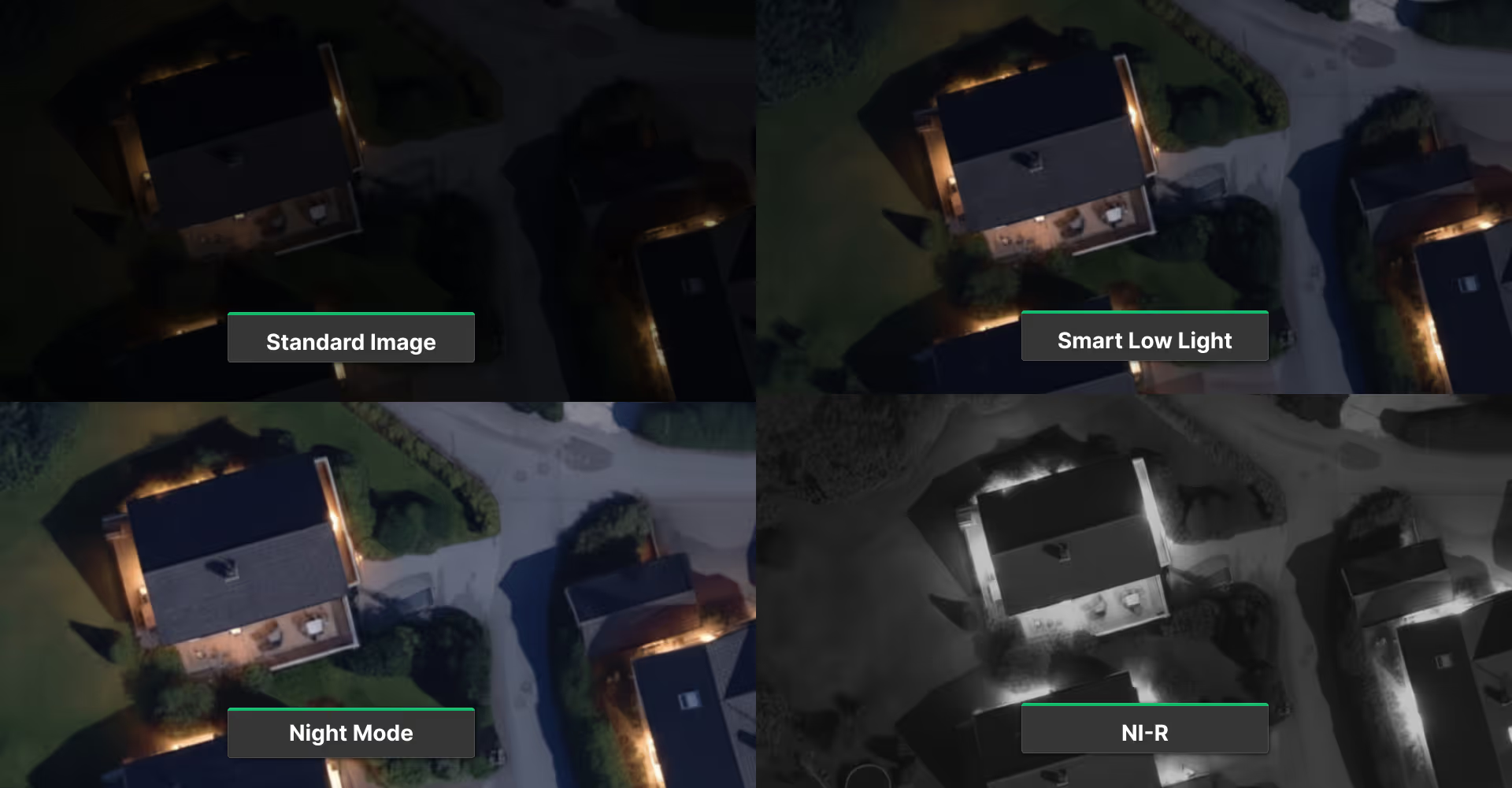
FlytBase now offers three complementary low-light tools. Smart Low Light enhances captured media quality through intelligent processing. Night Mode provides real-time full-color night vision on your live feed. NI-R Mode delivers high-contrast black-and-white imaging for maximum clarity at a distance. Each addresses specific scenarios. They work independently or together.
Smart Low Light: Better Evidence Capture
Smart Low Light enhances photos and videos captured in low-light conditions through multi-frame processing. Your live feed during the flight remains unchanged. This improvement applies only to saved media.
The value is straightforward: better evidence. When media might end up in an incident report or compliance documentation, enhanced media quality makes details more visible during review and provides clearer evidence.
Available on all docks (Dock 1, 2, and 3), working with the Zoom camera. Enable it from the Cockpit View camera settings whenever you're capturing documentation in low-light conditions.
Important: The setting doesn't persist across drone restarts. Enable it for each flight session.
Night Mode: Real-Time Visibility (Dock 3)
Smart Low Light improves what you capture. Night Mode improves what you see during the operation.
Night Mode dramatically increases sensor sensitivity, enabling both your live feed and captured media to show full-color night vision. Subjects, vehicles, and scene details that would be invisible in standard mode become clearly visible.
This changes how you work at night. You can identify people from their clothing and build. Make informed decisions based on what you're actually seeing, not assumptions about shapes in darkness.
Important notes:
- Available only on Dock 3 (Matrice 4D series)
- Works on all cameras except thermal
- Settings do not persist across drone restarts
- Access from the Cockpit View camera settings
Mode options:
- Off - Standard sensor sensitivity
- On - Night Scene mode always active
- Auto - Automatically enables/disables based on ambient light levels
Trade-off: Night Mode reduces video frame rate from 30 FPS to 15 FPS when enabled. For most security and inspection work, the visibility gain outweighs the frame rate reduction.
NI-R Mode: Maximum Contrast at Distance (Dock 3)
Night Mode provides full-color night vision. NI-R Mode trades color for contrast.
NI-R enables near-infrared imaging by removing the IR-Cut filter, producing high-contrast black-and-white footage. Particularly effective when you're tracking subjects or vehicles across large areas and color information matters less than maximum clarity.
Works best combined with Night Mode. Night Mode boosts sensor sensitivity, NI-R optimizes for contrast. Together, they provide maximum low-light performance for distant subject observation.
Available only on Dock 3. Requires 7x zoom or greater. Below 7x, NI-R has no visible effect even when enabled. This isn't a bug. The benefit appears at higher zoom levels where you need it most.
Choosing the Right Mode
These aren't competing options. They're tools for different moments.
Smart Low Light - Enable whenever capturing media in low-light conditions, regardless of which other modes you're using. Works with any camera mode combination. Available on all docks.
Night Mode (Dock 3) - Enable when you need real-time visibility in darkness. Full-color feed helps identify subjects, vehicles, and scene details.
Night Mode + NI-R (Dock 3) - Maximum low-light performance for observation. Black-and-white infrared contrast is especially effective at high zoom levels. Requires 7x or greater zoom.
Dock 1 and Dock 2 - Smart Low Light is your only option for low-light enhancement.
For security operations tracking subjects at a distance in darkness: Night Mode + NI-R + Smart Low Light on Dock 3.
For patrol documentation in low light: Smart Low Light on any dock.
Get Started
All three features are available now. Smart Low Light works across all docks. Night Mode and NI-R are Dock 3 capabilities.
Find these controls in Cockpit View camera settings during flight. Enable the modes appropriate for your scenario. Capture the footage you need with the visibility you need.
For questions about low-light operations or to share feedback on these enhancements, contact support@flytbase.com
FAQs
Find quick answers to common questions about compatibility, setup, features, and pricing
Smart Low Light enhances captured media only, while Night Mode brightens the live feed for real-time visibility.
NI-R is best for long-distance night-time monitoring where contrast matters more than color, such as perimeter or rooftop surveillance.
Yes. On Dock 3, Night Mode and NI-R can be combined for maximum low-light clarity, with Smart Low Light enhancing the final media.
Smart Low Light is available on all docks. Night Mode and NI-R are supported only on Dock 3.
.webp)
.svg)
.webp)
.png)
