




Get Your Free Drone Autonomy Guide Today!

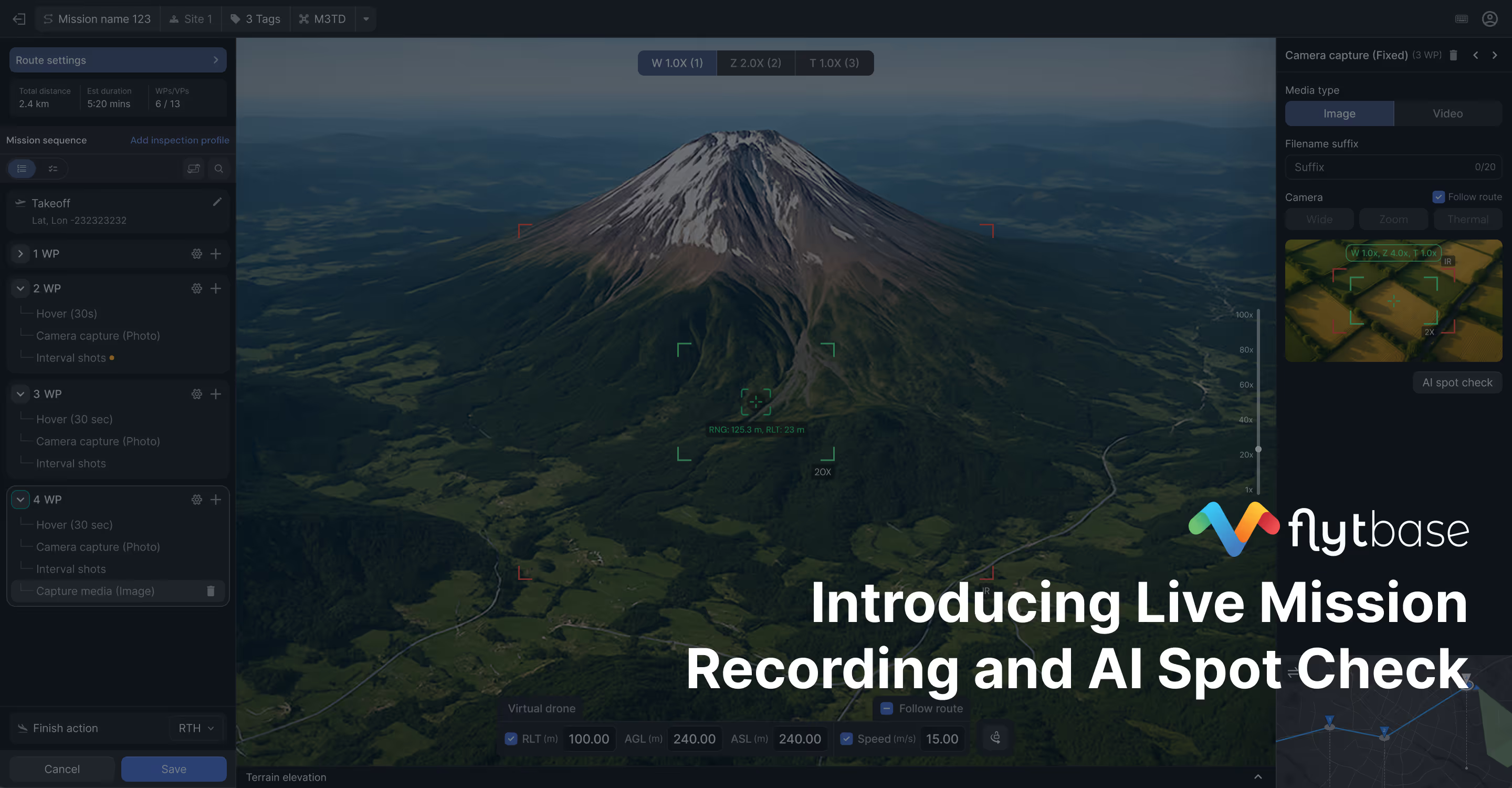
You've spent the better part of an hour creating a mission. Drop waypoints on a map, configure gimbal angles for each one, set zoom levels, adjust camera parameters. Execute the mission. The drone flies to the first waypoint and you discover it's not looking at what you need it to capture.
Land. Edit the mission. Adjust the gimbal pitch by two degrees. Fly again. Still not quite right. What looked perfect on a map doesn't translate to reality. For patrol routes, you're missing critical coverage areas. For inspection work at high zoom, a small positioning error means capturing the wrong equipment entirely. Third attempt. Fourth attempt. You're burning through battery cycles and flight time trying to get the drone to look at the right things.
And even when you finally get it right, there's another problem for high-zoom inspection work. That mission works today. On this flight. In these conditions. But when you execute it tomorrow, wind shifts positioning. Heading varies slightly. At high zoom, these small variations mean you're looking at the wrong thing again. You have a library of missions you can't fully trust to capture what you need, every time.
So you avoid creating new missions when you can. You work around the ones you have. You compromise on coverage because you know the alternative is hours of iterate-and-refine frustration, followed by uncertainty every time you execute.
.avif)
This isn't just wasted time. It's operational friction that shapes how you work. Missions that should take one flight take four. Routine patrols get delayed because nobody wants to deal with mission planning. Inspection schedules slip for the same reason. You're making tactical compromises because the tools impose too much overhead.
Two Connected Problems, Two Solutions
Mission creation shouldn't require multiple test flights and guesswork. Mission execution shouldn't require crossed fingers hoping conditions cooperate.
Live Mission Recording eliminates the iterate-and-refine cycle. AI Spot Check adds visual precision to those recorded missions for consistent execution even when positioning varies.
.avif)
These features work together, but you don't need both to get value. Live Mission Recording is available to all FlytBase customers right now. AI Spot Check is currently in early access, adding computer vision-based target correction to Live Mission Recording workflows.
Let's break down what each solves.
Live Mission Recording: Create Missions While Flying
The iterate-and-refine problem exists because you're planning missions on a map without seeing what the camera actually sees. You're guessing at gimbal angles, estimating coverage effectiveness, hoping your waypoint placement translates to the real world. Then you fly and discover it doesn't.
Live Mission Recording removes the guesswork. You create the mission while looking through the camera at what you actually need to capture.
Take off and start recording. Fly to each point using Go To Location and manual controls. Look at what you need to capture through your camera. For patrol routes, position to cover the building entrance, perimeter section, or parking area exactly how you want. For inspection work, frame the equipment or structural features precisely. Adjust gimbal pitch and yaw until it's right. Set your zoom level. When the camera shows exactly what you want to capture, hit "Capture Waypoint."
The drone's actual position, gimbal angles, zoom settings, and camera lens selection are all recorded. No translation from map to 3D space. No guessing whether 12 degrees of gimbal pitch will frame the shot correctly. You're seeing what the camera sees, so you know the mission will capture what you need.
When you capture a waypoint, the system creates an Oriented Shoot waypoint action. These actions automatically capture photos during mission execution. You don't need to add photo capture commands manually. After landing, your recorded mission appears in the mission planner ready to execute.
One flight. Mission created. No iterate-and-refine. No second flight to test whether your gimbal angles were right. No third flight to adjust coverage. The apprehension about creating new missions? Gone. You know it works because you watched it work.
Live Mission Recording is available to all FlytBase customers right now. No access request, no early access program. Start using it immediately.
AI Spot Check: Visual Precision for Repeatable Execution
Live Mission Recording solves mission creation for everyone. But there's a second problem specific to high-zoom inspection work: executing those missions consistently when environmental conditions vary.
You created a perfect inspection mission. The drone was looking at exactly the right equipment during recording. But when you execute that mission the next day, wind shifts the hover position. Heading varies. At 15x zoom, you're no longer looking at the equipment you recorded. You're looking at the mounting bracket next to it.
AI Spot Check uses computer vision to compensate for these positioning variations.
When you capture a waypoint during Live Mission Recording with AI Spot Check enabled, the system stores a reference image. When the mission executes, the onboard system uses visual matching to adjust gimbal orientation and positioning. The camera captures the same target even when conditions differ from the original recording flight.
For high-zoom inspection work documenting equipment or structural features across time, you're comparing the same target from the same perspective every time. The missions in your library become reliable.
How They Work Together
Live Mission Recording creates missions in one flight instead of four. AI Spot Check makes those missions execute accurately every time.
With Live Mission Recording alone (available now to all customers):
- Record missions by capturing waypoints while looking at actual targets
- Missions appear in your standard 2D mission planner
- No more iterate-and-refine cycle
With AI Spot Check added (currently in early access):
- Reference image capture at each waypoint enables visual target matching
- Missions appear in the 3D Mission Planner with spatial visualization
- Visual compensation for positioning variations during execution
When AI Spot Check is enabled for your account, missions recorded with Live Mission Recording appear in the 3D Mission Planner instead of the standard mission planner.
Hardware & Access
Supported hardware: DJI Dock 1, Dock 2, Dock 3
What's Available Now vs. Early Access
Live Mission Recording: Available to all customers immediately.
- No access request needed
- Use it today in your standard 2D mission planner
- Fly once, capture waypoints while looking at actual targets
- Execute repeatedly without iterate-and-refine cycles
AI Spot Check: Currently in early access.
- Adds computer vision-based target correction to Live Mission Recording
- Missions appear in 3D Mission Planner with enhanced visualization
- Reference image capture and visual target matching during execution
If you conduct regular inspection missions with high-zoom requirements, AI Spot Check can significantly improve capture consistency and eliminate repeatability concerns.
To join the AI Spot Check early access program:
Contact support@flytbase.com with:
- Your account details
- Brief description of your inspection use case
- Typical zoom levels used in your missions
We'll enable AI Spot Check for your account and provide guidance on getting started. Your feedback during early access helps us refine the feature before general availability.
Get Started
Eliminate the iterate-and-refine cycle today: Live Mission Recording is available to all FlytBase customers right now. Start a recording during flight, capture waypoints while looking through your camera at what you need to capture, and your mission is ready to execute. No more guessing at gimbal angles. No more test flights. One flight creates the mission.
Add visual precision for high-zoom inspection: If your missions require high-zoom capture across time and positioning variations create targeting inconsistencies, AI Spot Check solves this. Contact support@flytbase.com to request early access.
Two problems. Two solutions. Both available through FlytBase.
For questions about Live Mission Recording or AI Spot Check, contact support@flytbase.com
FAQs
Find quick answers to common questions about compatibility, setup, features, and pricing
It removes guesswork from mission creation by letting operators record waypoints while directly viewing the target, instead of estimating angles on a map.
AI Spot Check compares the live feed with a stored reference image and fine-tunes the framing, keeping targets centered even when conditions change.
No. AI Spot Check builds on the reference images captured during Live Mission Recording, so both work together.
Yes. By capturing accurate framing during recording and correcting alignment during replay, these features reduce re-flights and improve documentation consistency.
.webp)
.svg)
.webp)
.png)
